La TDT de los 80

Como ya comentamos aqui, desde que empezó la TDT, varias cosas han cambiado. Una de ellas es que, una vez la infraestructura básica funciona, cualquiera con un par de PCs monta un canal televisivo. La prueba es que cadenas regionales extremadamente pequeñas, han lanzado dos, tres o incluso cuatro canales a la vez. El problema ya no es tener un canal, sino más bien llenarlo con contenidos.

Y desde que esto es así, tenemos que ver todo tipo de reposiciones. No importa si tienen sentido o no. Solo importa que llenan minutos y que hoy en día salen casi “regaladas”. Algunas de estas reposiciones son cosa fina, como “El hombre y la tierra”. Otras sin embargo, resultan ridículas, como las reposiciones de concursos televisivos de hace 20 años, donde las preguntas que se hacen a los concursante son del tipo a “¿De qué potencia militar y económica es presidente Mijail Gorbachov”?

Viendo ahora uno de estos canales regionales, me he partido la caja con un documental que, a juzgar por su contenido, debía datar de mediados de los 80. Presentado por unos irreconocibles Meryl Streep y Robert Redford, trataba el tema del cambio climático desde una perspectiva ochentera.

Al principio ha resultado divertido escuchar afirmaciones como que “el principal problema del mar Mediterráneo son los vertidos de aguas fecales”. Quién lo iba a decir, yo creía que el verdadero problema del Mediterráneo eran los turistas borrachos… Cómo cambian las cosas. También ha sido curioso observar el asombro del presentador ante una nueva infraestructura que en el futuro iba a ser de obligada instalación en todas partes: una planta de tratamiento de aguas residuales, como la que se iba a inaugurar en Atenas en el lejano 1991. ¡Qué maravillas nos depara el futuro!

Conforme ha ido avanzando el documental, me he dado cuenta de que ver un programa de hace tantos años tenía algo bueno.

Y es que oír afirmar que los 5.000 millones de habitantes del planeta ya eran un problema por aquel entonces da que pensar, ahora que casi alcanzamos los 7.000. Comprobar cómo hace 25 años, conceptos como desarrollo sostenible, reciclaje, energías renovables, ya fluían por los discursos de políticos como Margaret Thatcher o George Bush (padre), hace que realmente te entre la risilla floja cuando escuchas decir exactamente las mismas cosas a Zapatero, Rajoy o compañia.

En 25 años, nada ha cambiado. O casi nada.

Así que cuando he terminado el documental escuchando al presentador afirmar que “La presión medioambiental está provocando cambios en mundos tan complicados como el de la política internacional”, o que “a los países ricos no les va a quedar otro remedio que colaborar con los países en desarrollo, para afrontar los problemas globales que se ciernen sobre nosotros”, ha sido la guinda del pastel.

Ni la presión medioambiental ha cambiado un carajo, ni los países ricos colaboran con nadie. Más bien al contrario: mandan las plantas de producción a los países con políticas medioambientales más laxas y con salarios más bajos (que no son los más desarrollados precisamente), para que contaminen allí, y así no nos molestan demasiado.

Así que la pregunta obligada es:

¿Hasta cuando vamos a seguir creyendo que los políticos van a solucionar los problemas del mundo?

Sometimes, paying a bit for software makes the difference

I have been using FTP client programs for a long while. I always used FileZilla as a great solution. This free application is indeed great, and very recommendable for home users, but I have been finding some corrupt uploads from time to time.

So, I decided to pay a bit for another FTP client application: SmartFTP. It´s been like 4 months using it and still no corruptSmartFTP uploads yet.

This is just an example of how 50 US$ can save you many many hours and headaches, which of course cost much more than that.

Outlook Error. Could not open Outlook Window

Today, I suddenly started receiving the above error. Among the many fixes for this situations depicted here, what worked for me was Method 3: Resetting the Navigation pane.

To do so, just select Start->Run and then type “outlook /RESETNAVPANE”. It worked for me.

Read the instructions on the above link about what side effects can have resetting the navigation pane.

Cheers!

Enabling DivX/MKV video playback from USB device in Samsung LED B6000

Since last year, I´m one of the happy owners of this magnificent 46” LED TV:

Samsung UE40B7000

There is just one thing that I was missing: DivX/MKV video playback from USB devices.

Last week, a friend bought a Samsung Series 6 too, but the LCD version. I was shocked when I saw this TV included the option to play videos from USB devices, so I decided to investigate a bit if it was possible to activate that option to mine, via a firmware upgrade or so. AND IT WAS!

The best part is you don´t need even to upgrade your firmware, it´s just a matter of changed several values in the service menu of the TV.

DISCLAIMER you enter the service menu at your own risk, altering the wrong settings in the service menu could result in your TV not functioning as it should
Note: This operation might work on some firmware versions only. Google a bit around to find more information about this. With mine, it worked fine.

1.- Enter service menu

With the TV in StandBy mode (off), press the following remote control buttons, one by one: Info, Menu, Mute and then switch the TV on by pressing Power. When the TV turns on, you will see some menus like the following:

The navigation in this menu is done by pressing up/down only. Keep in mind that pressing right means enter the selected option. Be very careful to not change any value accidentally. That can be catastrophic for your TV.

2.- Make the following changes in the Service Menu

First, change the model number of your screen, from B6000 to B7000. This will enable the WiseLink Movie option: Enter the “Option” submenu, navigate to “Model”, press right, and then press right several times until you change from B6000 to B7000.

In Control->Sub Option menu, turn ON the following values:

  • WISELINK MOVIE
  • WISELINK WRITE
  • HIGH DEVI

3.- Results

Done. Now you have video playback support from USB devices. I have tried several movies and not all of them have been correctly played, but must of them yes.

What you will have:

It supports DivX, XVid, and MKV. I also tried several movies in HD (both 720 and 1080), and they worked well. Also AC3 audio seems to work.

What you won´t have:

Subtitles, dual audio, picture size formats, navigation (only 2x forward)

However… ¡¡¡¡¡¡ IT´S A GREAT IMPROVEMENT !!!!!!

Cheers

Simax en el Microsoft Innovation Day

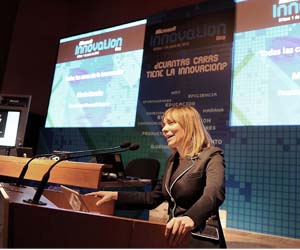
María Garaña, en BilbaoEl pasado Martes, 1 de Junio, Microsoft celebró en Bilbao el primer Innovation Day, donde nos mostró las tendencias en innovación que la corporación está investigando, así como los nuevos productos que llegan al mercado en los próximos meses. Hablaron de Natal, el cual se espera en el mercado para finales de año, hablaron de Mavis, un sistema de indexación de contenidos de video impresionante, de Photosynth, un sistema bastante impresionante que genera fake cubemaps 3D a partir de fotos normales geo-posicionadas, por supuesto de Azure, Windows Phone, Zune HD, de las nuevas tendencias en educación, en sanidad, en el hogar del futuro. En fin una gozada.

Simax estuvo invitada a una de las ponencias como “caso de éxito”, según Microsoft, junto con la directora de Indisys, otra gran empresa con una tecnología que aplica la inteligencia artificial para aplicativos del lenguaje natural, realmente impresionante.

Directivos de Intel dejaron ver ordenadores portátiles especialmente diseñados para niños, que resisten incluso caídas desde 60 cm de altura (impresionante ver al ponente dándole patadas). Me gustó mucho un gráfico que mostraron de la tendencia en disipación de calor que seguían los procesadores de tecnología Pentium. De no haber cambiado de tecnología, ahora mismo un procesador disiparía por cm2 el mismo calor que la tobera de una lanzadera espacial. Gracias a la evolución tecnológica, la reducción del tamaño de los transistores, y a la paralelización, se ha conseguido reducir el consumo de forma dramática. Por cierto, Intel tiene un prototipo de procesador (por el momento para estaciones de computación), con ¡¡¡80 núcleos en un solo chip !!!

También me gustó mucho la ponencia de César Gaicoya, reputado arquitecto, y uno de los artífices del museo Guggenheim de Bilbao, junto a Frank Gehry. Mostró el proceso de diseño y fabricación que siguieron en el museo, haciendo hincapié en los puntos donde más se innovo (que no fueron pocos). Se me caía la baba, la verdad…

En fin, un gusto.

Strange physics or math results since August 2009 release of SlimDX

Logo

If you use the magnificent SlimDX (something that you should definitely do), and have been experiencing strange issues with maths or physics, keep reading.

Quaternion Multiplication Issue

As you probably know, Quaternion multiplication is not commutative. This means that “a*b” is not the same than “b*a”.

It seems that XNA and D3DX implement this algorithm in exactly the opposite way, so for the operation: Multiply(Quaternion left, Quaternion right), one does left*right and the other does right*left.

Since the August 2009 release of SlimDX, they changed the way this operation was being done, as they thought they were previously doing it wrong. That’s why you might be getting strange maths or physical results if you install any version newer than March 2009.

I write this post because, believe me, this kind of errors are pretty difficult to trace (if you don’t pay the needed attention to Release Notes, as we did). In our case, we were suddenly getting erratic Rigid Body behavior, but everything else seemed to be working fine.

Of course, the first reaction was to think that some change in our code was to blame. It was obviously something related to maths, vector operations or matrices maybe, but after checking everything for some time, we saw no change related to that.

Then we realized it had something to do with the SlimDX update, so we started checking all the changes done to the library since March 2009, looking for changes in Math code. et voilá: revision 1199: Quaternion multiply was backwards. That was making our rigid bodies go crazy…

We should definitely read the Release Notes of each new version better next time.

Warning

According to this issue, the SlimDX team is changing the method again (back to the old way) in the next June release. So pay attention to the change.

Cheers!

XNArkanoid for Windows Phone 7

A few weeks ago I started a Windows Phone 7 port of my old XNArkanoid.

02 

It’s a C#-XNA remake of the classic Taito’s Arkanoid. This version is written in XNA 4.0 for Windows Phone. It’s not finished yet, but you can find all the information and source code at CodePlex:

arkanoidlogo original  http://xnarkanoid.codeplex.com

Targeting C++/CLI Projects to .Net Framework 3.X in Visual Studio 2010

If you work with C++/CLI projects, and recently jumped to Visual Studio 2010, you have probably noticed that Visual Studio re-targeted your project to .Net Framework 4. This is the default behavior when converting C++/CLI projects to VS2010, as some of its C++ compiler tools are only compatible with .Net Framework 4.

The problem is that sometimes you cannot jump to .Net 4 yet. Maybe because customer’s restrictions, maybe because compatibility problems with 3rd party tools, whatever… If that’s your case, you need to target to .Net Framework 3.0 or 3.5, and still want to use VS2010, you can do the following:

(Source: here and here and even better here)

1.- Change the target Framework of your project

On a C# project, you can select the target Framework by simply changing a value in a combo box. On a C++/CLI project, you will find this in the project properties page:

It´s just a read-only value, that you cannot change directly. To change it, you must edit the project´s file (.vcxproj). To do so, open it in the notepad, or better, use the new feature included in VS2010: Edit project file by right-clicking in the project and selecting the following menu entry:

image

You will end up with an xml view of the file. Search for a node called PropertyGroup. As a child node of this one, you should create another one with the form:

<TargetFrameworkVersion>v4.0</TargetFrameworkVersion>

It might already be there or not. If it’s not, create it. If it is, just edit its value, setting the target framework version you want: v3.0, v3.5, etc, ending with something like this:

image After the change, the project properties page will reflect the new target framework

2.- Reload the project

After any change in project’s file, you will need to reload it, by closing and re-opening the solution, or by selecting “Reload Project” in the context menu of VS.

3.- Install Visual Studio 2008 SP1

If you remember, we said that the VS2010 C++ compiler tools were not compatible with any Framework other than 4.0. That’s why as soon you change the target Framework and recompile, VS2010 will try to use the C++ compiler tools of Visual Studio 2008. If they are not present, it will stop the compilation with an error, requesting you to install VS2008.

Just a quick note: you need to install also the Service Pack 1 to VS2008.

4.- Issues

In my case, and with my specific project, the Microsoft C++/CLI Optimizing Compiler crashed if I targeted the project to .Net Framework 3.5. I really didn’t investigate why, as I really wanted to target v3.0 and didn’t have much time. Targeting v3.0 worked just fine.

So if you find the same error and find the reason or a solution, please comment!

Cheers!

Dependency error on Visual Studio 2010 Setup project

Since I moved to Visual Studio 2010, I have had several issues with Setup Projects. They convert from 2008 just fine, but I have detected some misbehaviors, specially related to DLL dependencies.

This morning, I came to a situation where Visual Studio always detected a DLL dependency which should not exist anymore. I tried marking the dependency as non-vital, excluding it. Nothing worked. My EXE file no longer depends on that DLL, but it was still there, and as it was an automatically detected dependency, I could not delete it. I tried even to set the DLL in the proper location (where Visual Studio was supposedly searching for it), but it didn’t work either. Visual Studio was still complaining about DLL not found.

The only thing that seemed to work momentarily was re-adding the EXE file that supposedly was dependant on that DLL. That fixed the DLL not found errors, but then appeared another one: “Unable to update the dependencies of the project”.

Searching a bit about this last message, I’ve found this post talking about garbage in project’s dependencies. Clayton James explains how to get rid of that error, cleaning the project by yourself in notepad. I found that information very useful.

However, in my specific case, it was not necessary to wipe all the Hierarchy and Files nodes (what wipes your solution too, making you to re-add all your files to your setup project). In my case it was enough with removing the references to the conflicting DLL from the Files section. That made the trick.

Hope it helps.

Getting audio from your computer to your TV Speakers… a usual headache…

Taking the audio signal from your computer to your LCD/LED screen speakers is sometimes very easy, and sometimes quite tricky, depending on the model and builder of your graphics card. If you want to do so, there are several things you should be aware of:

First, you should know that nowadays this operation is possible both through HDMI and DVI ports, as today's graphics cards can take audio out from DVI ports too (using a DVI-HDMI cable or an adaptor).

Second, remember that you have two options to take audio from your computer to the LCD screen:

1.- Use external analog audio through a Jack-Jack or Jack-RCA cable (depending on the analog audio input of your screen)

2.- Use digital audio through the HDMI cable (available on every screen)

If you want to use the first option, you will need to configure your computer to use the Speakers as the default audio device. If you select the second option, you will want to set your Digital HDMI audio device as default.

Where to do so? In Start->Control Panel->Sound:

image

The good thing about second option is that it uses just one cable for both audio and video, but in Both options you will have to deal with other configuration issues to make them work with the TV Speakers:

Different audio behaviors depending on HDMI input port

TV Screens usually include several HDMI input ports, and they behave differently regarding audio input. The typical options are:

  • HDMI port only: The TV will try to get audio from HDMI cable only
  • HDMI/DVI port: This kind of HDMI input usually has a external Jack or RCA audio input just by it. The thing is that some TVs will always take audio from that external jack, and some will decide when to get audio from HDMI or from those external Jack/RCAs automatically, and this is the most usual cause of problems.

In those that make this decision automatically, when they decide one option or the other? If the computer is “telling” the TV that the HDMI cable has audio, the screen will take audio from there. If not, it will take audio from the external Jack/RCA.

So, if you want audio to go through an external analog jack-jack cable, HDMI should carry NO AUDIO (so the screens takes audio from the external cable).

Now, next step is: how to control when the computer sends audio through HDMI or not?

Controlling the presence of audio in the HDMI cable

This task is to be managed by the graphics card, as it’s the graphics card who put signal on the HDMI cable. So, you will need to go to the nVidia Control Panel to adjust this option (under the Change Resolution tab). If the graphics card detects the presence of a HDMI or DVI cable, it will offer the possibility to enable or disable Audio on the wire (see next picture):

image

This is what tells the TV if the cable carries audio or not. It sometimes happens that you change this option, click apply and the screen doesn’t detect the change. If that’s your case, force the screen to notice by switching to a different resolution, and then switching back to the original one, with the selected audio option. You normally can tell if the screen noticed the change by a small blink or by the screen going black for a moment.

I don’t want two wires… HDMI audio rocks!

So, you want audio to go through HDMI? Good option…. Let’s see how to do it:

We already know the basic steps:

  • Set your HDMI (not the speakers) as default audio device (Start->Control Panel->Sound)
  • Set your graphics card to enable audio on HDMI (nVidia control panel)
  • Connect your HDMI cable to a HDMI input port of your screen (if you want to avoid problems, better select a normal HDMI input, not the HDMI / DVI).

There is an additional step needed for this:

Connecting the S/PDIF cable

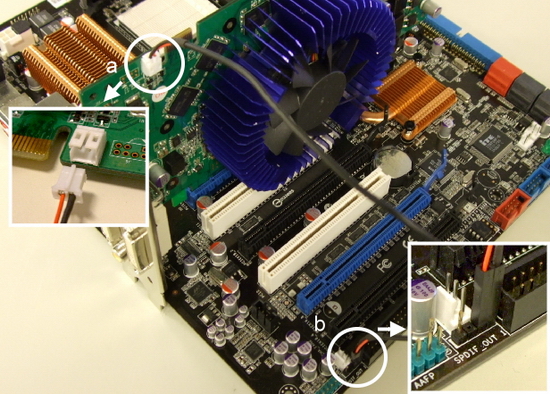
Didn’t you ask yourself how is it possible that graphics cards take audio out through the HDMI cable? The S/PDIF cable (Sony/Philips Digital Interconnect Format) is the answer. It will take digital audio from your motherboard (taken from a standard interface with the sound card) to the graphics card, and the graphics card will output it to the HDMI cable. This cable is usually a very small, two pin cable, supplied with your graphics card:

See your motherboard and graphics card’s manuals to locate the two pins where to connect the cable. They are also usually marked in the board with labels like: SPDIF or AUDIO. The following are some examples:

image

A unusual case: The Point Of View GeForce GTX 260

This last week, we acquired a Point Of View GeForce GTX 260, just like this one:

P1000197

We had to invest quite some time in order to make audio work with this card:

1.- The card came with a SPDIF cable, and although the manual mentions the possibility to use it, it didn’t specify where to connect it. There are two free pins in the card but it doesn’t say SPDIF or AUDIO anywhere. Initially, they seem to be some kind of jumpers, as they are marked as JP0 and JP1.

2.- So, we tried using external analog jack-jack, but the nVidia latest driver (197.45) seemed to fail disabling HDMI audio on this card, so our Samsung LCD screen always selected HDMI audio as source. No luck…

3.- As nothing worked, we decided to take the risk and to connect the SPDIF cable to those JP0 and JP1… et voilá! That did the trick. Now we have digital audio running on HDMI.

No manual, specs or information we could found on Point Of View will tell you where to connect the SPDIF cable, so for your reference, here is how you should connect it (white on the right, red on the left, from this perspective and with this connection on the motherboard):

P1000196

Hope it helps.

Take Care!

Integrate CopySourceAsHTML into release version of VisualStudio 2010

CopySourceAsHTML is one of the most useful tools for developers who blog or post code in any form. Now that Visual Studio 2010 is out, it’s time to integrate both tools.

They released a patch and a new version which technically supports 2010, but it was released for the beta version (I guess), and now it doesn´t integrate well with the release version. As Sean mentions in his blog, all you need to do is:

1.- Download CopySourceAsHTML from here

2.- Install it normally, selecting VS 2010 support (it won´t register well in the program though).

3.- Go to the CopySourceAsHTML installation directory, typically:

C:\Program Files (x86)\J.T. Leigh & Associates\CopySourceAsHtml

4.- Copy the contents of the folder

5.- Find what folder is VStudio using for storing the AddIns (there is more than one), in Tools->Options->Add in/Macros Security. Typically (you might have to create this folder):

C:\ProgramData\Microsoft Visual Studio\Addins

6.- Paste the addin file there, re-launch VStudio, and make sure it’s enabled:

Add-in Dialog

7.- Open the file "CopySourceAsHtml.2010.AddIn” and open it with a text editor (it´s an XML file). In every entry <version>9.0</version>, replace the “9.0” with a “10.0”.

And that´s it!

Best video player for Windows Mobile PocketPC

After testing CorePlayer and some others, I have to say that I moved back to TCPMP again. CorePlayer is great, and it´s greatly optimized for handheld devices, but lacks AC3 audio support.

TCPMP on the other hand, although it has been deprecated, perfectly supports AC3 and many other formats, and is still the best player for WM devices.

There is a recomp version specifically compiled for Windows Mobile 6.1 that works flawlessly, and includes most of the plugins available.

You can download from here:

http://www.htcmania.com/showthread.php?t=51241

Don´t worry, it´s free.

Videogame history in a short. Revenge of the pixels!!!

One of the best animation videos I’ve seen in a long long time. It’s not just the story, which is great and remind me of great great videogame moments (watching the frog jumping across the street is priceless…), but it’s also very well done. Be sure to watch it!


Cheers!