Asegura IT Camp 2, by Informática 64

image

Lo pasamos bien. Francamente bien.

Y eso que cada vez que escucho una charla del Maligno, o de cualquiera de sus secuaces dedicados a la seguridad informática se me ponen de corbata…

Más info en Windows Tecnico:

http://www.windowstecnico.com/archive/2010/10/28/asegurait-camp-ii-de-nuevo-un-233-xito.aspx

Salud!

Where is Springfield?

I´m a big fan of The Simpsons (seasons 6-10 especially). I always had the idea that they did never actually revealed the location of Springfield. Of course, it´s located nowhere, as it doesn’t exist, but as there are several Springfields in the U.S., they never mentioned what state it was located in. In fact, there are many episodes where they “almost” say it, but something always happens in the last moment that avoids revealing it.

This is an old and well known issue. There are even people with enough time to dedicate many hours trying to locate Springfield in the map, analyzing every episode. If you don’t believe me, check this site.

The strange thing is, today I was watching episode 7x07 (King Size Homer, with Spanish audio), and they ended the episode saying (Mr. Burns):

<<Thanks Homer, your bravery and quick thinking have turned a potential Chernobyl into just another Pennsylvania Plant>>

I couldn’t believe my ears. Did they really revealed the location of Springfield in this episode?

No, they definitely didn’t. Of course, it is quite unlikely that people with time enough to check episode by episode hints about possible locations for Springfield just missed this one. So I switched to the English version, just to realize that the dialogs in the original version were completely different:

<<Homer, your bravery and quick thinking have turned a potential Chernobyl into a mere Three Mile Island>>

I was curious as I didn’t know what a “Three Mile Island” was, so I checked out Wikipedia. I finally found it refers to a nuclear accident that took place in 1979, in a plant with the same name which (surprisingly), is located in Pennsylvania. People that translated the original text probably decided that Spaniards wouldn’t understand the “Three Mile Island” joke, and decided to change it. Just another reason to avoid watching movies in Spanish.

Original version is always better.

Cheers!

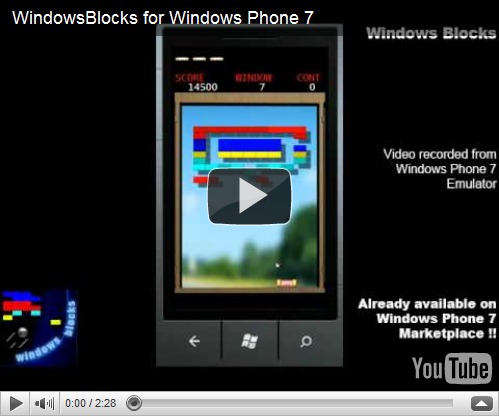
Windows Blocks published in the Windows Phone 7 MarketPlace

  Yesterday, we published our first game for Windows Phone 7.

Captura5<<Windows Blocks brings the classic brick-breaker experience to the Windows Phone 7. With tens of different levels, with progressing difficulty, you will be able to check your skills breaking the bricks that block the views of your house, window by window. Test yourself controlling the magnetic platform with your device's accelerometer (other input methods available too), and learn to use all the Power Pills that can be hidden behind the bricks, to help you out with your duty. Go, break'em all ! >>

You can download a trial version from the MarketPlace and buy it if you like it. In the following days, we´ll publish our second game, the first in 3D.

Comments are welcome!

Other Pictures:


Captura7 Captura10  Captura11  Captura12  Instructions

New XNA Game Programming book available from PACKT Publishing

In the following weeks, I´m going to review a new book that just came out from PACKT Publishing, about XNA Game Programming.

XNA 4.0 Game Development by Example: Beginner's Guide

The book, written by Kurt Jaegers, is described by the author as:

“This book is a step-by-step tutorial that includes complete source code for all of the games covered. It adopts an engaging style to teach all the game development concepts. Each block of code is explained, and game development concepts are diagrammed and covered in detail. Each game begins with a concept description and concludes with suggestions for expanding on the finished game.”

You can find further details of the book here.

Will tell you more once I’ve read it.

Cheers!

“Error loading pipeline assembly” compile error on Content Projects

If when trying to compile a Content Project you see a “Error loading pipeline assembly” message, and don’t know why, keep reading:
As you already know, the Content Pipeline always executes locally in your Windows machine, to parse and process all the contents into the XNB files. If you don’t have this clear, I´d suggest you to read this Shawn Hargreaves blog post. The above error appears sometimes when you add in your Content Project a reference to a Windows Phone Game Library assembly, or to any other platform game library.
I say “sometimes” because this doesn't happen always. For example, it fails on my laptop, but not in my desktop machine (the first is Vista and second is 7, don’t know if that has anything to do with it).
The problem is that sometimes (especially since Content Projects where separated from regular projects), you need to reference the same assembly from both a Content Project and from a main game project. For instance, if you store in a extra assembly object proxies or descriptions to be used by the XML Intermediate Serializer, you will need them in both the Content Project (to make the serialization), and in the runtime game, to make the de-serialization.
So, if all of them are Windows-XNA based, no problem. But what happens when the main game project is a Windows Phone project? The scenario is:
image
As I said, if the Aux. Game Library is a Windows Phone game library, for example, it will give you the mentioned compiling problems if you reference it in the Content Project. And if it’s a Windows game library, you won’t be able to reference in the Main Game Project, which is a Phone project. How we solve this?

Creating a Project Copy

Obviously, the solution is to have two different projects/assemblies. One for Windows and another one for WindowsPhone. Of course, as we said that duplicating is wrong, we don’t want to duplicate the classes and code in both projects, so the solution is to create a <<project copy>>: an additional project that produces a different assembly type, but that links to the same source files than the other project.
This is a extremely useful feature automated in XNA solutions (you can always do the same manually in other project types). To do so, you just need to right-click in the Solution Explorer, on the project you want to copy, and select:
  • Create a copy of project for Windows
  • Create a copy of project for Windows Phone
  • Create a copy of project for XBox
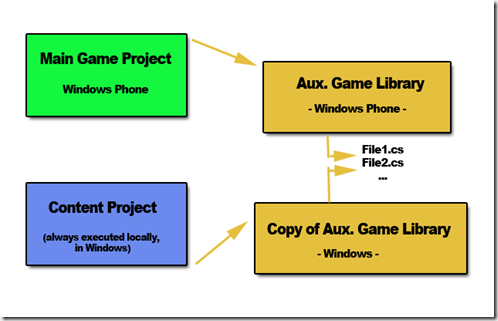
The task will be done automatically for you. Now you end up with this scenario:
image
This way, you can keep the Content Project always referencing Windows Game Libraries, and your main Game project referencing the assembly appropriate for each platform, without duplicating code.
Cheers!

Comment, I mean… Connect, I mean… KINECT !!!!!

It’s closer. Closer….. I cannot wait to have fun at home with this thing.

The dancing game promises to be epic, with a bunch of guys and a couple of beers…. ufff… just check out the guy with glasses in the video…

image

EPIC !!!!!

Fixed -problems installing Windows Phone Developer Tools-

Today, I had some troubles first uninstalling my existing CTP release of the Windows Phone Developer Tools (depicted here). It was a required step to be able to install the newest release of these tools.
Now that I managed to uninstall the previous version, I have found other problems installing the newer one. More precisely, the problem appeared when trying to install the Windows Phone Developer Resources package, getting an error like the following in the automatic web installer (it surprisingly required a reboot when starting to install it, and the error did pop up when resuming the install process after the reboot).
image
I searched in the log file where the individual installer packages were located, and I found the location of the WindowsPhoneDeveloperResources_en.msi file in question. After trying to launch it manually, I received the following errors while trying to register a DLL (that’s probably why the web installer decided to reboot, expecting to be able to register the dll in a fresh Windows start):
image
image
After a while trying to find the reason for this, I found this site with similar problems, suggesting to uninstall any Microsoft Silverlight related entry in the Program&Features list. Unluckily, it didn’t work for me.
In my case, I had at the same time Visual Studio 2008 & 2010. I uninstalled the 2008 just in case that was the cause. But no. Again no luck.
Then, as a desperate measure, I tried to uninstall anything related to Microsoft .Net Framework 4, and magically, THAT DID THE TRICK.
Now both the Windows Phone Developer Resources standalone installer and the automatic full web setup work flawlessly. I recommend you using the automatic web setup, as it will download and restore everything: Silverlight, .Net Framework 4, XNA Game Studio 4, etc.
May be it was a combination of factors, so if any of you have similar experiences, please share them here, so we can find out what was going on with it.
Thanks!

How uninstall Windows Phone Developer Tools CTP

If you try to install any newer version of the Windows Phone Developer Tools, you will probably see a dialog box complaining about older versions of these tools, like the CTP, which cannot be updated automatically, and have to be removed before continuing with the new installation:

So, when you go to the Properties & Features window, select the Windows Phone Developer Tools, and click on Remove, you will find that the default uninstaller won’t work, finding the following dialogs:

To properly uninstall these tools, you have two options:

  1. 1.- Use the XNA Game Studio Cleanup Tool, which supports the Windows Phone Tools. More info here.
  2. 2.- An easier way depicted here: go to your default Windows Phone Tools installation folder (by default: C:\Program Files (x86)\Microsoft Visual Studio 10.0\Microsoft Visual Studio 2010 Express for Windows Phone  CTP – ENU), right-click on the file vs_setup.msi, and select Uninstall.

Et’voilá. Tools uninstalled.

Cheers!

Pequeños calambres en portátil Dell XPS M1530

Desde hace un tiempo, y al igual que muchos otros usuarios de este ordenador, o del modelo 1330, sentía unas descargas eléctricas muy pequeñas en mi portátil, al tocar la parte metálica del mismo, y únicamente cuando estaba enchufado a la red. No era como si te electrocutaras, pero resultaba molesto.

Esto se debe a que el cargador o adaptador eléctrico por defecto de Dell no incluye toma de tierra, por lo que las pequeñas derivaciones eléctricas, en lugar de salir por la toma de tierra, salen por ahí.

No he tenido más que llamar al servicio técnico de Dell (magnífico, como siempre), y me han enviado otro que si la incluye.

Si vais a comprar un portátil, os recomiendo que os decantéis por esta marca, y que escojáis la opción de garantía extendida. Merece la pena pagar un poco más, ya que si un portátil se estropea, normalmente no hay nada que hacer con él (salvo cambiar la placa entera, algo que es casi tan caro como un portátil nuevo).

Si además escogéis un modelo XPS, contaréis con el servicio técnico XPS Premium, el cual es mejor todavía que el normal. Te atienden las 24h, todos los días de la semana.

Realmente satisfecho con ellos, si señor.

Apple reinvents the wheel

According to the following video, Apple is about to launch a new revolutionary laptop with no keyboard on it. They promise to have a battery life of up to 19 min. and an email sent in less than 45 min.

LOL!

Creating shortcuts to .Exe files in Windows Mobile 6.5

Many people asks how to do this exactly, when you have an exe file, not an installed application (through .CAB or whatever), and you want to have it in the Programs menu, to be able to add as shortcuts, widgets, etc.

It´s easy:

1.- Open Windows Explorer and go to the folder where the EXE file is

2.- Select the file and and click on “copy” it

3.- Click on Menu->Edit->Paste as shortcut. This will create a shortcut to your exe file

4.- Select the shortcut and “cut” it

5.- Go to “YourDevice\Windows\Start Menu\Programs” and paste the shortcut there.

Now, your exe file will be available through the “Programs” menu option, so it will be visible for any "skin” or “today” application you have installed.

Cheers!