“Error loading pipeline assembly” compile error on Content Projects

If when trying to compile a Content Project you see a “Error loading pipeline assembly” message, and don’t know why, keep reading:
As you already know, the Content Pipeline always executes locally in your Windows machine, to parse and process all the contents into the XNB files. If you don’t have this clear, I´d suggest you to read this Shawn Hargreaves blog post. The above error appears sometimes when you add in your Content Project a reference to a Windows Phone Game Library assembly, or to any other platform game library.
I say “sometimes” because this doesn't happen always. For example, it fails on my laptop, but not in my desktop machine (the first is Vista and second is 7, don’t know if that has anything to do with it).
The problem is that sometimes (especially since Content Projects where separated from regular projects), you need to reference the same assembly from both a Content Project and from a main game project. For instance, if you store in a extra assembly object proxies or descriptions to be used by the XML Intermediate Serializer, you will need them in both the Content Project (to make the serialization), and in the runtime game, to make the de-serialization.
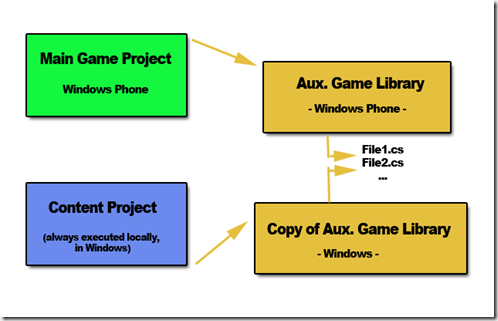
So, if all of them are Windows-XNA based, no problem. But what happens when the main game project is a Windows Phone project? The scenario is:
image
As I said, if the Aux. Game Library is a Windows Phone game library, for example, it will give you the mentioned compiling problems if you reference it in the Content Project. And if it’s a Windows game library, you won’t be able to reference in the Main Game Project, which is a Phone project. How we solve this?

Creating a Project Copy

Obviously, the solution is to have two different projects/assemblies. One for Windows and another one for WindowsPhone. Of course, as we said that duplicating is wrong, we don’t want to duplicate the classes and code in both projects, so the solution is to create a <<project copy>>: an additional project that produces a different assembly type, but that links to the same source files than the other project.
This is a extremely useful feature automated in XNA solutions (you can always do the same manually in other project types). To do so, you just need to right-click in the Solution Explorer, on the project you want to copy, and select:
  • Create a copy of project for Windows
  • Create a copy of project for Windows Phone
  • Create a copy of project for XBox
The task will be done automatically for you. Now you end up with this scenario:
image
This way, you can keep the Content Project always referencing Windows Game Libraries, and your main Game project referencing the assembly appropriate for each platform, without duplicating code.
Cheers!

Comment, I mean… Connect, I mean… KINECT !!!!!

It’s closer. Closer….. I cannot wait to have fun at home with this thing.

The dancing game promises to be epic, with a bunch of guys and a couple of beers…. ufff… just check out the guy with glasses in the video…

image

EPIC !!!!!

Fixed -problems installing Windows Phone Developer Tools-

Today, I had some troubles first uninstalling my existing CTP release of the Windows Phone Developer Tools (depicted here). It was a required step to be able to install the newest release of these tools.
Now that I managed to uninstall the previous version, I have found other problems installing the newer one. More precisely, the problem appeared when trying to install the Windows Phone Developer Resources package, getting an error like the following in the automatic web installer (it surprisingly required a reboot when starting to install it, and the error did pop up when resuming the install process after the reboot).
image
I searched in the log file where the individual installer packages were located, and I found the location of the WindowsPhoneDeveloperResources_en.msi file in question. After trying to launch it manually, I received the following errors while trying to register a DLL (that’s probably why the web installer decided to reboot, expecting to be able to register the dll in a fresh Windows start):
image
image
After a while trying to find the reason for this, I found this site with similar problems, suggesting to uninstall any Microsoft Silverlight related entry in the Program&Features list. Unluckily, it didn’t work for me.
In my case, I had at the same time Visual Studio 2008 & 2010. I uninstalled the 2008 just in case that was the cause. But no. Again no luck.
Then, as a desperate measure, I tried to uninstall anything related to Microsoft .Net Framework 4, and magically, THAT DID THE TRICK.
Now both the Windows Phone Developer Resources standalone installer and the automatic full web setup work flawlessly. I recommend you using the automatic web setup, as it will download and restore everything: Silverlight, .Net Framework 4, XNA Game Studio 4, etc.
May be it was a combination of factors, so if any of you have similar experiences, please share them here, so we can find out what was going on with it.
Thanks!

How uninstall Windows Phone Developer Tools CTP

If you try to install any newer version of the Windows Phone Developer Tools, you will probably see a dialog box complaining about older versions of these tools, like the CTP, which cannot be updated automatically, and have to be removed before continuing with the new installation:

So, when you go to the Properties & Features window, select the Windows Phone Developer Tools, and click on Remove, you will find that the default uninstaller won’t work, finding the following dialogs:

To properly uninstall these tools, you have two options:

  1. 1.- Use the XNA Game Studio Cleanup Tool, which supports the Windows Phone Tools. More info here.
  2. 2.- An easier way depicted here: go to your default Windows Phone Tools installation folder (by default: C:\Program Files (x86)\Microsoft Visual Studio 10.0\Microsoft Visual Studio 2010 Express for Windows Phone  CTP – ENU), right-click on the file vs_setup.msi, and select Uninstall.

Et’voilá. Tools uninstalled.

Cheers!

Pequeños calambres en portátil Dell XPS M1530

Desde hace un tiempo, y al igual que muchos otros usuarios de este ordenador, o del modelo 1330, sentía unas descargas eléctricas muy pequeñas en mi portátil, al tocar la parte metálica del mismo, y únicamente cuando estaba enchufado a la red. No era como si te electrocutaras, pero resultaba molesto.

Esto se debe a que el cargador o adaptador eléctrico por defecto de Dell no incluye toma de tierra, por lo que las pequeñas derivaciones eléctricas, en lugar de salir por la toma de tierra, salen por ahí.

No he tenido más que llamar al servicio técnico de Dell (magnífico, como siempre), y me han enviado otro que si la incluye.

Si vais a comprar un portátil, os recomiendo que os decantéis por esta marca, y que escojáis la opción de garantía extendida. Merece la pena pagar un poco más, ya que si un portátil se estropea, normalmente no hay nada que hacer con él (salvo cambiar la placa entera, algo que es casi tan caro como un portátil nuevo).

Si además escogéis un modelo XPS, contaréis con el servicio técnico XPS Premium, el cual es mejor todavía que el normal. Te atienden las 24h, todos los días de la semana.

Realmente satisfecho con ellos, si señor.

Apple reinvents the wheel

According to the following video, Apple is about to launch a new revolutionary laptop with no keyboard on it. They promise to have a battery life of up to 19 min. and an email sent in less than 45 min.

LOL!

Creating shortcuts to .Exe files in Windows Mobile 6.5

Many people asks how to do this exactly, when you have an exe file, not an installed application (through .CAB or whatever), and you want to have it in the Programs menu, to be able to add as shortcuts, widgets, etc.

It´s easy:

1.- Open Windows Explorer and go to the folder where the EXE file is

2.- Select the file and and click on “copy” it

3.- Click on Menu->Edit->Paste as shortcut. This will create a shortcut to your exe file

4.- Select the shortcut and “cut” it

5.- Go to “YourDevice\Windows\Start Menu\Programs” and paste the shortcut there.

Now, your exe file will be available through the “Programs” menu option, so it will be visible for any "skin” or “today” application you have installed.

Cheers!

MVP renewal

Today, I received some great great news. I have been renewed as a Microsoft DirectX/XNA MVP for 2010.

It’s a great honor for me to continue in this program. I’ll do my best to deserve it for next year too!

Thank you guys!!!


La TDT de los 80

Como ya comentamos aqui, desde que empezó la TDT, varias cosas han cambiado. Una de ellas es que, una vez la infraestructura básica funciona, cualquiera con un par de PCs monta un canal televisivo. La prueba es que cadenas regionales extremadamente pequeñas, han lanzado dos, tres o incluso cuatro canales a la vez. El problema ya no es tener un canal, sino más bien llenarlo con contenidos.

Y desde que esto es así, tenemos que ver todo tipo de reposiciones. No importa si tienen sentido o no. Solo importa que llenan minutos y que hoy en día salen casi “regaladas”. Algunas de estas reposiciones son cosa fina, como “El hombre y la tierra”. Otras sin embargo, resultan ridículas, como las reposiciones de concursos televisivos de hace 20 años, donde las preguntas que se hacen a los concursante son del tipo a “¿De qué potencia militar y económica es presidente Mijail Gorbachov”?

Viendo ahora uno de estos canales regionales, me he partido la caja con un documental que, a juzgar por su contenido, debía datar de mediados de los 80. Presentado por unos irreconocibles Meryl Streep y Robert Redford, trataba el tema del cambio climático desde una perspectiva ochentera.

Al principio ha resultado divertido escuchar afirmaciones como que “el principal problema del mar Mediterráneo son los vertidos de aguas fecales”. Quién lo iba a decir, yo creía que el verdadero problema del Mediterráneo eran los turistas borrachos… Cómo cambian las cosas. También ha sido curioso observar el asombro del presentador ante una nueva infraestructura que en el futuro iba a ser de obligada instalación en todas partes: una planta de tratamiento de aguas residuales, como la que se iba a inaugurar en Atenas en el lejano 1991. ¡Qué maravillas nos depara el futuro!

Conforme ha ido avanzando el documental, me he dado cuenta de que ver un programa de hace tantos años tenía algo bueno.

Y es que oír afirmar que los 5.000 millones de habitantes del planeta ya eran un problema por aquel entonces da que pensar, ahora que casi alcanzamos los 7.000. Comprobar cómo hace 25 años, conceptos como desarrollo sostenible, reciclaje, energías renovables, ya fluían por los discursos de políticos como Margaret Thatcher o George Bush (padre), hace que realmente te entre la risilla floja cuando escuchas decir exactamente las mismas cosas a Zapatero, Rajoy o compañia.

En 25 años, nada ha cambiado. O casi nada.

Así que cuando he terminado el documental escuchando al presentador afirmar que “La presión medioambiental está provocando cambios en mundos tan complicados como el de la política internacional”, o que “a los países ricos no les va a quedar otro remedio que colaborar con los países en desarrollo, para afrontar los problemas globales que se ciernen sobre nosotros”, ha sido la guinda del pastel.

Ni la presión medioambiental ha cambiado un carajo, ni los países ricos colaboran con nadie. Más bien al contrario: mandan las plantas de producción a los países con políticas medioambientales más laxas y con salarios más bajos (que no son los más desarrollados precisamente), para que contaminen allí, y así no nos molestan demasiado.

Así que la pregunta obligada es:

¿Hasta cuando vamos a seguir creyendo que los políticos van a solucionar los problemas del mundo?

Sometimes, paying a bit for software makes the difference

I have been using FTP client programs for a long while. I always used FileZilla as a great solution. This free application is indeed great, and very recommendable for home users, but I have been finding some corrupt uploads from time to time.

So, I decided to pay a bit for another FTP client application: SmartFTP. It´s been like 4 months using it and still no corruptSmartFTP uploads yet.

This is just an example of how 50 US$ can save you many many hours and headaches, which of course cost much more than that.

Outlook Error. Could not open Outlook Window

Today, I suddenly started receiving the above error. Among the many fixes for this situations depicted here, what worked for me was Method 3: Resetting the Navigation pane.

To do so, just select Start->Run and then type “outlook /RESETNAVPANE”. It worked for me.

Read the instructions on the above link about what side effects can have resetting the navigation pane.

Cheers!

Enabling DivX/MKV video playback from USB device in Samsung LED B6000

Since last year, I´m one of the happy owners of this magnificent 46” LED TV:

Samsung UE40B7000

There is just one thing that I was missing: DivX/MKV video playback from USB devices.

Last week, a friend bought a Samsung Series 6 too, but the LCD version. I was shocked when I saw this TV included the option to play videos from USB devices, so I decided to investigate a bit if it was possible to activate that option to mine, via a firmware upgrade or so. AND IT WAS!

The best part is you don´t need even to upgrade your firmware, it´s just a matter of changed several values in the service menu of the TV.

DISCLAIMER you enter the service menu at your own risk, altering the wrong settings in the service menu could result in your TV not functioning as it should
Note: This operation might work on some firmware versions only. Google a bit around to find more information about this. With mine, it worked fine.

1.- Enter service menu

With the TV in StandBy mode (off), press the following remote control buttons, one by one: Info, Menu, Mute and then switch the TV on by pressing Power. When the TV turns on, you will see some menus like the following:

The navigation in this menu is done by pressing up/down only. Keep in mind that pressing right means enter the selected option. Be very careful to not change any value accidentally. That can be catastrophic for your TV.

2.- Make the following changes in the Service Menu

First, change the model number of your screen, from B6000 to B7000. This will enable the WiseLink Movie option: Enter the “Option” submenu, navigate to “Model”, press right, and then press right several times until you change from B6000 to B7000.

In Control->Sub Option menu, turn ON the following values:

  • WISELINK MOVIE
  • WISELINK WRITE
  • HIGH DEVI

3.- Results

Done. Now you have video playback support from USB devices. I have tried several movies and not all of them have been correctly played, but must of them yes.

What you will have:

It supports DivX, XVid, and MKV. I also tried several movies in HD (both 720 and 1080), and they worked well. Also AC3 audio seems to work.

What you won´t have:

Subtitles, dual audio, picture size formats, navigation (only 2x forward)

However… ¡¡¡¡¡¡ IT´S A GREAT IMPROVEMENT !!!!!!

Cheers