Simax&Toyota. ECO-EXPERIENCE

Ya son más de 350 personas que han aprendido a reducir el consumo de combustible con sus vehículos en el simulador ECO-Experience de Simax&Toyota.


Recordad que podéis llevaros dos noches de hotel y un Toyota Prius durante un fin de semana si sois el conductor más ecológico del día!!!

Salón Internacional del Automóvil de Madrid (Feria de Madrid-IFEMA). Pabellón 6. Stand Toyota

Simax&Toyota. ECO-EXPERIENCE

En el primer día y medio del Salón Internacional del Automóvil de Madrid, ya han sido 120 las personas que han pasado por el simulador ECO-EXPERIENCE que Simax ha desarrollado para Toyota. Eso significa que ha estado permanentemente en funcionamiento, ya que cada persona realiza un ejercicio de unos 8 minutos de duración.

El objetivo de este simulador es formar en la conducción ecológica, ofreciendo consejos de conducción y configuración del vehículo para ahorrar combustible y, por lo tanto, reducir las emisiones de CO2.

Hablando ayer con una persona relacionada con la gestión medioambiental me dijo algo muy interesante:

"Si hemos conseguido, a base de campañas promocionales, concienciar a la gente para que recicle su basura, a pesar de que con ello no obtiene ninguna ganancia económica... ¿cómo no vamos a ser capaces de concienciarles para que conduzcan de forma ecológica, si ello puede reportarles un gran ahorro en combustible?. Solo hacen falta más campañas y herramientas como ésta."

Es una muy buena reflexión. Sí señor.

Asi que ya sabes: si quieres aprender a ahorrar un montón de pasta en gasoil, pasar un buen rato, y además llevarte un muy buen premio si eres el conductor más ecológico del día, pásate por el stand de Toyota (Feria de Madrid-IFEMA, pabellón 6), y prueba ECO-EXPERIENCE, de Simax-Toyota.


Simax&Toyota Eco-Experience

En los últimos meses, en Simax hemos trabajado duro para desarrollar lo que es nuestra última creación, centrada en la conducción ecológica. A partir del día 23 de Mayo, y hasta el 1 de Junio, la presentaremos en exclusiva el Salón Internacional del Automóvil de Madrid, de la mano de Toyota.


Toyota lo ha llamado EcoExperience, y va a incluir muchas sorpresas que todavía no podemos desvelar.

A lo largo de esta semana iremos publicando información aqui y en www.simax.es .

Stay tuned!


Cómo hacer el Hacha compatible con Windows Vista

Hoy he tenido que usar el Hacha, y no funcionaba en Vista, diciendo que le faltaba el archivo "msvbvm50.dll".

He visto a gente por inet ofreciendo packs con ese archivo, otros diciendo que había que poner el Hacha en "compatibilidad con XP". Bueno, pues ni lo primero ni lo segundo.

Basta con:

1.- Ir al directorio de Windows y buscar el fichero "msvbvm60.dll", la versión que viene en Vista. 2.- Copiar el fichero al directorio del hacha
3.- Renombrarlo, cambiando el 6 por el 5.

Al Hacha le da igual y funciona. Así que solucionado.

Salu2!

Disable automatic folder type discoverey in Vista Explorer

Vista is a great O.S. but, of course, has many things that could be better. Among all the things of Vista I don´t like, probably the most annoying one is the Automatic Folder Type Discovery feature.

This feature applies different templates to folders basing on their contents. For instance, if a folder contains mostly pictures, it will apply the "picture template" which uses a certain collection of columns for the files´properties: date the picture was taken, etc.


I don´t like this at all, basically for two reasons:

1.- It doesn´t work properly because it decides that a folder contains pictures when, in fact, has many other file types. And it´s absolutely annoying when you have a folder with 3d models, textures, sounds, etc, and you cannot see the "Modified Date" column or sort the files by "Type" because Vista decided that was a picture-only folder...

2.- This behavior might be appropiate for those home-users that normally use the computer for storing pictures and sending emails, but... what happens with developers and many other user profiles?

What I´m saying is: this feature would be good (if it worked better) for something like "Windows Vista Email-Sender-Only Edition", but I think that many people is asking for something like: "Windows Vista Developers Edition"... kindof "WindowsVista, without all the garbage".

Thankfully, this kind of stuff can be disabled. However, this time is a little bit trickier than just going to "that" menu and unchecking an option. Here it goes:


Note: This procedure implies editing the Windows Registry. Be sure to know what you are doing before proceeding and maybe, make a backup of the registry before changing it. If you don´t know what the registry is, or how to make a backup of it, maybe you shouldn´t go ahead...


1.- Run regedit
2.- Go to:


HKEY_CURRENT_USER\Software\Classes\Local Settings\Software\Microsoft\Windows\Shell


3.- If not already present, create a new Key in ther named: "Bags"
4.- Inside that "Bags" key, add another one with the name: "AllFolders"
5.- Inside that "AllFolders" key, add another one with the name: "Shell"
6.- Inside the "Shell" key, add a new "String Value" or "Valor alfanumérico" (in spanish), with the name "FolderType".
7.- Modify the "FolderType" string setting the value: "NotSpecified". Your registry should look like this:
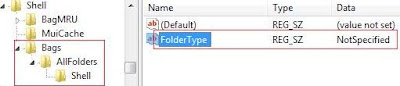


8.- Close regedit.


Et voilá!. The Automatic Folder Type Discovery feature is disabled.

Note: This procedure and picture was taken from here. Thanks to www.windows-now.com for the info.


Cheers!

Logitech Gaming Software 5.01 BUG: Corrupts Windows Vista Registry

Yesterday, I had to run the regedit (I realize, that for the first time in months) and it looked absolutely corrupt. The computer worked fine, but it´s aspect was scary, very scary...

I´m not such a Registry-Freak as many people there, you know, kind of: "hey, this process usually gets 0.5Mb of mem less, this should be a trojan", and then comes all the stuff with HighJackThis, Ant-Spy, Anti-Trojans and Anti-Spartans too... ;)

But I know enough about the registry to see that a hundred entries in the HKEY_CURRENT_USER with names like "{(", "Ó│" or "#a" are not good at all.

So, after one day and a half struggling with the issue, I´ve realized that the Logitech Gaming Software was to blame. See the following pics:

1.- Healthy Registry. (before installing Logitech Gaming Software 5.01):

2.- Registry after installing and reboot (strange entry marked in red):


3.- Registry after a second reboot (strange entry family growing):


The thing is, every time the system boots up, the LGS adds a crap entry to the registry, under HKEY_CURRENT_USER. So after a long while, your registry looks like "The Matrix" screensaver...

I´ve made a quick google about this stuff and found nothing, but maybe it´s a known issue. Anyway, I´ll send an email to the WingManTeam people to see if this is really a bug or it has a reasonable explanation (probably not ;).

My specs:

Dell XPS 420 (Quad Core, 3Gb RAM, GeForce 8800 GT). WindowsVista Ultimate 32 bits with Service Pack 1. Logitech G25 Racing Wheel.

Cheers!

A vueltas con los problemas para acceder a sitios Microsoft

Seguro que alguno de vosotros, la semana pasada notó cosas raras en la red. En nuestro caso, no pudimos acceder a NINGÚN servidor microsoft en media semana. Era raro, porque los servidores daban cierta respuesta (por lo que no estaban totalmente caídos), pero las páginas casi nunca terminaban de cargarse.

Y marco en mayúsculas lo de NINGUNO porque ni el site español, ni el americano, ni los foros, ni nada de nada funcionaba, al contrario de lo que dicen en este post de "El Pais", en el que se insinúa que la culpa fue de MSFT, no de télefónica, y cito: "los clientes de la operadora que no emplean Hotmail ni Messenger no han tenido dificultades en el servicio, lo que orientaría las pesquisas hacia Microsoft."

Pues señores, yo jamás uso Hotmail ni Messenger, y ya te digo si tuve problemas.

Dado que Microsoft no detectó problema alguno en sus servidores, y los únicos clientes que experimentamos "dificultades" fuimos los de Telefónica, parece bastante claro qué estaba pasando no?

En fin...

File && || folder deleting in C#

Recently, I´ve been playing around with file and folder deleting from C# applications. I´ve seen two issues very easy to workaround that might help you.

1.- System.Drawing.Bitmap.FromFile() locks the file used.

If you try to delete a folder containing a bitmap you used in that manner, it will fail, as it´ll be locked by your application. In order to avoid this behavior, you can just clone the bitmap an dispose the original. Just like this:


Bitmap tempBitmap = (Bitmap)Bitmap.FromFile(filename);
mStoredBitmap = new Bitmap(tempBitmap);
tempBitmap.Dispose();

Of course, there are many ways to fix this. This one clones the bitmap from memory so the file can be unlocked in the dispose.

2.- How to delete a file or folder sending it to the recycle bin?

This is a pretty obvious need and, at first sight, there´s no direct support for that in plain C#. In this link, you will find some information about this.

Among the solutions offered there, there´s a very easy and direct one (if you don´t mind to add a reference to Microsoft.VisualBasic dll in yor application).

Just add that reference, and instead of System.IO.Directory.Delete(), use this one:

Microsoft.VisualBasic.FileIO.FileSystem.DeleteDirectory
(
filename or folder,
Microsoft.VisualBasic.FileIO.UIOption.OnlyErrorDialogs,
Microsoft.VisualBasic.FileIO.RecycleOption.SendToRecycleBin
);

Cheers!

Sistema de copia de archivos en Windows Vista

Los informáticos sabemos hacer la tira de cosas.

Por ejemplo, sabemos pintar una cadena de ADN enterita en 3D, sin dejarnos ni un solo cromosoma. Sabemos hasta guiar una sonda espacial a lo largo y ancho del cosmos, sin que se choque ni una sola vez con Bender ni la civilizción de Malacai (el que se arranca un brazo para bromear...).

Sin embargo, hay una tarea que se nos resiste. Realmente debe de ser algo que solo está al alcance de cuatro programadores rusos y algunos semi-dioses, porque desde los tiempos más remotos de Windows 3.11, seguimos sin ser capaces de calcular cuánto van a tardar en copiarse un puñado de ficheros.

Ciertamente, entiendo la problemática. Sé que es dificil, muy dificil... y probablemente yo no sabría hacerlo mejor de lo que lo hacía Windows XP. ¡Pero coño! cuando hoy me he encontrado con esta "Vista" los pelillos se me han puesto como picos de escarpias...


47.760 días y 2 horas. Tiene que ser la ostia llevar cuarentaysietemil días esperando y que todavía te queden dos horas eh?

En fin, que eso son aproximadamente 130 años, 292 días.... y 2 horas, por supuesto...

Más vale que al final la copia se hizo en 4 minutos... ¿Como carajo se puede programar un algoritmo que ante un retardito de caca llegue a la conclusión de que va a tardar 130 años? ¿Es que los chicos de Vista no conocen aquello de descartar datos basura?

Bueno, como soy un tío con fé, en breve espero poder decir ....

---- God bless the Service Pack 1 ----

porque nos haya resulelto cosillas como esta. A mi la verdad, me exasperan...

Saludos secuaces!

The Evolution Show (I)

Muy buenas a todos.

En primer lugar, agradecer a toda la gente que se acercó por el Palacio de Congresos Municipal de Madrid para asistir al Evolution Show, y de paso probar la tecnología Simax.

En segundo lugar, a Microsoft, que como siempre nos hizo pasar un rato genial, y nos dió la oportunidad de presentar por primera vez en público el producto.

En fin, que muchas gracias a todos. Tuvimos una muy buena acogida y espero que la gente pasara un buen rato.

Aqui va una fotillo del stand. Trataré de subir más poco a poco.


Saludos secuaces !

Aviso Programación Gráfica. Upna

Aviso a mis alumnos de Programación Gráfica (Ingenería en Telecom, Upna).

Esta semana que viene no habrá clase ni el lunes 25 por la mañana ni el jueves 28 por la mañana, y que estoy fuera de viaje. Si que habrá práctica el lunes por la tarde, con Iosu.

Trataremos de recuperar las horas cuando se pueda.

Avisad por favor a quienes conozcáis, por si hay alguien que todavía no lo sepa. Un saludo a todos,

Iñaki.

Simax en The Evolution Show (Microsoft). IFEMA 26 y 27 de Feb. 2008

La próxima semana, más concretamente los días 26 y 27 de Febrero, el equipo de Simax estará presente en el IFEMA, mostrando un prototipo del simulador de conducción y acompañando a nuestros coleguillas de Microsoft. Todo ello en el evento:

The Evolution Show (Lanzamiento Windows Server 2008, Visual Studio 2008 y SQL Server 2008)

Más información aqui:

http://www.microsoft.com/spain/lanzamiento2008/default.mspx

How to disable the Error Report Tool in Windows Vista (dw20.exe)

If you are a software developer, it´s quite frequent that applications crash when thery´re not finished. If you usually open the task manager to take a look, you´ve probably noticed that a process called dw20.exe kicks in everytime an app crash.

Well I honestly still don´t know if that process was the cause, but since I installed vista, application crashes were very slow to recover. I´ve been googling around for a way to disable that process, and it has taken like ten minutes for me to find the solution.

The trick is: SET YOUR CONTROL PANEL TO CLASSIC VIEW. Something I probably shoulded have done earlier... ;).

The option you need only appears in the classic view. Its "Problem reports and Solutions" or "Informes de problemas y soluciones", in spanish.

Right there, select "Change configuration" and then "Advanced configuration". Then select "Disable error reporting" and that´s it.

I´ll tell how it works now. Cheers!