Label on top of a PictureBox with transparent backcolor

It´s quite usual to need a label to be drawn in top of a PictureBox with a transparent backcolor.

In normal circumstances, setting the BackColor of the Label to "Transparent" would suffice, but when the label is on top of a PictureBox it doesn´t work as expected, as it draws parent´s backcolor as background, not the picture.

To make the label be drawn properly, it must be in the list of Controls of the PictureBox, what is not achieved by normal drag&dropping the the design view.

So, you would need to make the change manually, for example, in the constructor of the form:

public CTOR()
{
InitializeComponent();
...
this.Controls.Remove(label);
this.pictureBox.Controls.Add(label);
}

Et Voilá!

UVAtlas. D3DXCreateTextureGutterHelper fails with some Meshes

I finally found the solution to a problem that was driving me nuts.

D3DXCreateTextureGutterHelper (or the constructor of TextureGutterHelper, if on MDX) throws an "Invalid Call" exception with certain meshes.

I came to a situation where the method worked for a Mesh generated by D3DXCreateUVAtlas, but failed for the (aparently) SAME mesh created by me:

* Same number of vertices/faces
* Same attribute table
* Same vertex format
* Same Mesh Options
* Same declarations
* Same indices at IndexBuffer
* SAME EVERYTHING

Then, what was the cause?

My meshes have 2 or more different sets of TexCoords. One of them to address the UVAtlas, and others for other kind of textures. Aparently, D3DXCreateTextureGutterHelper will fail if the coordinates addressing the UVAtlas are not in the 1st set of TexCoords.

In my case, UVAtlas TexCoords are always in the 2nd set of TexCoords. That´s why it was failing.

Workaround: create a temp Mesh and copy the UVAtlas coordinates to the first set. Then, the method will succeed.

PS To the Microsoft DirectX Team:

The work done with all the UVAtlas functions is priceless. They are really useful, but please, document things like this a little bit.

This kind of problems are very easy to work around when known, but finding the cause by brute-force investigation can take hours and hours.

Instalar aplicación Compact Framework/Windows Mobile en 4 pasos

Últimamente, en mis pocos ratos libres, estoy dedicando tiempo a estudiar el Compact Framework y el desarrollo para dispositivos móbiles, trasteando con DirectX Mobile, WinForms y todo lo que se me ocurre.

El caso es que quería que un programilla bastante útil que he terminado apareciera en la lista de programas instalados, para poder añadirlo al menú de acceso rápido de mi HTC Touch.

Para conseguir esto, hay que crear un pequeño instalador que, en lugar de símplemente copiar la aplicación al dispositivo móvil, efectúe todo el registro habitual de un proceso de instalación. Ésto se puede hacer con un instalador "User Friendly", con ventanitas y demás, o con la variante más rápida, pero menos elegante, que usa ficheros CAB. Por motivos de rapidez iremos por ésta última vía.

La tarea es muy sencilla y rápida, así que voy a explicarla en cuatro pasos:

1.- En la solución donde tengas tu proyecto para Compact Framework, añade un nuevo proyecto escogiendo: Add -> New Project. Después, escoge la categoría "Other Project Types" -> "Setup and Deployment" -> "SmartDevice CAB Project".

2.- Si hacéis "click" en el nuevo proyecto, podrás especificar en sus propiedades el nombre del producto, propietario, etc, etc. Si hacéis "right click", aparecerá un menú contextual, donde podréis elegir: "View -> File System". Se abrirá una pestaña en la ventana principal de Visual Studio. Ésta contiene los contenidos del sistema de ficheros que queremos dejar en la máquina donde se va a instalar nuestra aplicación.

3.- Seleccionamos "Application Folder" en la mitad izda. de esta pestaña, y en la mitad dcha, hacemos "right click" y seleccionamos: Add -> Project Output. Se abrirá una ventanita donde podrás elegir (en el ComboBox de arriba) qué otro proyecto de la solución será el que queremos instalar. Escogéis el que queráis, dejáis marcada la opción "Primary Output" y pulsáis en Aceptar.

4.- Hacéis "right click" sobre el nuevo proyecto de setup y pulsais sobre "Build". Si todo va bien, en la carpeta de salida del proyecto encontraréis el nuevo y flamante CAB de instalación.


Así de fácil.

VisibleChanged Event, missing in the Compact Framework

If you need to do something in the VisibleChanged event of a form or control, using the Compact Framework, you´ll see that this event is missing.

You can easily fix this shadowing the Visible property with a newer one, and firing the event by yourself. Just like this:

public event System.EventHandler VisibleChanged;
public new bool Visible
{
get { return base.Visible; }
set
{
if (base.Visible != value)
{
base.Visible = value;
if (VisibleChanged != null)
VisibleChanged(this, EventArgs.Empty);
}
}
}

Selecting nodes in a TreeView control with a right button click

Someone asked me yesterday how to select nodes in a System.Windows.Forms.TreeView control, using a right click, instead of a left click.

i.e. this is useful if you are developing a WindowsExplorer-like application, where you will want to select a node with a right click to make a copy-paste operation.

A very easy workaround about the default behavior of the TreeView (which only selects with a left-button click), is something like this:

private void treeView1_MouseClick(object sender, MouseEventArgs e)
{
if (e.Button == MouseButtons.Right)
treeView1.SelectedNode = treeView1.GetNodeAt(e.X, e.Y);
}

This event will be fired before the context menu´s Opening event, and will select the node clicked with the right button.

Cheers!

Simax&Toyota ECO-EXPERIENCE


"Simax, el simulador más potente del Salón"
AutoBild 133/2008


Bueno, al final fueron 782 las personas que pasaron por el simulador ECO-Experience. Dado que el primer día (23 de Mayo) el salón solo estuvo abierto medio día al público, eso nos deja una utilización media del simulador de 9.7 horas al día (de las 10 que IFEMA estaba abierto).


Algunos datos relevantes:


782 conductores
Más de 1000 km recorridos
Reducción de emisiones de CO2: 50.6 % (*)


(*) La reducción de emisiones se medía entre el primer test y el segundo. En el primero se conducía un Toyota Auris con la siguiente configuración: presion de neumáticos baja, ventanillas abiertas, clima encendido, sobrepeso en el maletero, portaequipajes, etc, y se desactivaba todo consejo de conducción. En el segundo, se utilizaba el mismo vehículo pero con la configuración corregida, y activando consejos de conducción que, entre otras cosas, advertían del punto óptimo para cambiar de marcha.


Mejor resultado de todo el salón:
2.06 Km recorridos en 2 minutos consumiendo tan solo 2.7 L/100 de media


Los 10 conductores ecológicos que ganaron cada día se llevaron un fin de semana en un hotelito rural con un Toyota Prius gratis para el los dos días.

Simax&Toyota. ECO-EXPERIENCE

Ya son más de 350 personas que han aprendido a reducir el consumo de combustible con sus vehículos en el simulador ECO-Experience de Simax&Toyota.


Recordad que podéis llevaros dos noches de hotel y un Toyota Prius durante un fin de semana si sois el conductor más ecológico del día!!!

Salón Internacional del Automóvil de Madrid (Feria de Madrid-IFEMA). Pabellón 6. Stand Toyota

Simax&Toyota. ECO-EXPERIENCE

En el primer día y medio del Salón Internacional del Automóvil de Madrid, ya han sido 120 las personas que han pasado por el simulador ECO-EXPERIENCE que Simax ha desarrollado para Toyota. Eso significa que ha estado permanentemente en funcionamiento, ya que cada persona realiza un ejercicio de unos 8 minutos de duración.

El objetivo de este simulador es formar en la conducción ecológica, ofreciendo consejos de conducción y configuración del vehículo para ahorrar combustible y, por lo tanto, reducir las emisiones de CO2.

Hablando ayer con una persona relacionada con la gestión medioambiental me dijo algo muy interesante:

"Si hemos conseguido, a base de campañas promocionales, concienciar a la gente para que recicle su basura, a pesar de que con ello no obtiene ninguna ganancia económica... ¿cómo no vamos a ser capaces de concienciarles para que conduzcan de forma ecológica, si ello puede reportarles un gran ahorro en combustible?. Solo hacen falta más campañas y herramientas como ésta."

Es una muy buena reflexión. Sí señor.

Asi que ya sabes: si quieres aprender a ahorrar un montón de pasta en gasoil, pasar un buen rato, y además llevarte un muy buen premio si eres el conductor más ecológico del día, pásate por el stand de Toyota (Feria de Madrid-IFEMA, pabellón 6), y prueba ECO-EXPERIENCE, de Simax-Toyota.


Simax&Toyota Eco-Experience

En los últimos meses, en Simax hemos trabajado duro para desarrollar lo que es nuestra última creación, centrada en la conducción ecológica. A partir del día 23 de Mayo, y hasta el 1 de Junio, la presentaremos en exclusiva el Salón Internacional del Automóvil de Madrid, de la mano de Toyota.


Toyota lo ha llamado EcoExperience, y va a incluir muchas sorpresas que todavía no podemos desvelar.

A lo largo de esta semana iremos publicando información aqui y en www.simax.es .

Stay tuned!


Cómo hacer el Hacha compatible con Windows Vista

Hoy he tenido que usar el Hacha, y no funcionaba en Vista, diciendo que le faltaba el archivo "msvbvm50.dll".

He visto a gente por inet ofreciendo packs con ese archivo, otros diciendo que había que poner el Hacha en "compatibilidad con XP". Bueno, pues ni lo primero ni lo segundo.

Basta con:

1.- Ir al directorio de Windows y buscar el fichero "msvbvm60.dll", la versión que viene en Vista. 2.- Copiar el fichero al directorio del hacha
3.- Renombrarlo, cambiando el 6 por el 5.

Al Hacha le da igual y funciona. Así que solucionado.

Salu2!

Disable automatic folder type discoverey in Vista Explorer

Vista is a great O.S. but, of course, has many things that could be better. Among all the things of Vista I don´t like, probably the most annoying one is the Automatic Folder Type Discovery feature.

This feature applies different templates to folders basing on their contents. For instance, if a folder contains mostly pictures, it will apply the "picture template" which uses a certain collection of columns for the files´properties: date the picture was taken, etc.


I don´t like this at all, basically for two reasons:

1.- It doesn´t work properly because it decides that a folder contains pictures when, in fact, has many other file types. And it´s absolutely annoying when you have a folder with 3d models, textures, sounds, etc, and you cannot see the "Modified Date" column or sort the files by "Type" because Vista decided that was a picture-only folder...

2.- This behavior might be appropiate for those home-users that normally use the computer for storing pictures and sending emails, but... what happens with developers and many other user profiles?

What I´m saying is: this feature would be good (if it worked better) for something like "Windows Vista Email-Sender-Only Edition", but I think that many people is asking for something like: "Windows Vista Developers Edition"... kindof "WindowsVista, without all the garbage".

Thankfully, this kind of stuff can be disabled. However, this time is a little bit trickier than just going to "that" menu and unchecking an option. Here it goes:


Note: This procedure implies editing the Windows Registry. Be sure to know what you are doing before proceeding and maybe, make a backup of the registry before changing it. If you don´t know what the registry is, or how to make a backup of it, maybe you shouldn´t go ahead...


1.- Run regedit
2.- Go to:


HKEY_CURRENT_USER\Software\Classes\Local Settings\Software\Microsoft\Windows\Shell


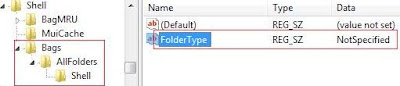
3.- If not already present, create a new Key in ther named: "Bags"
4.- Inside that "Bags" key, add another one with the name: "AllFolders"
5.- Inside that "AllFolders" key, add another one with the name: "Shell"
6.- Inside the "Shell" key, add a new "String Value" or "Valor alfanumérico" (in spanish), with the name "FolderType".
7.- Modify the "FolderType" string setting the value: "NotSpecified". Your registry should look like this:


8.- Close regedit.


Et voilá!. The Automatic Folder Type Discovery feature is disabled.

Note: This procedure and picture was taken from here. Thanks to www.windows-now.com for the info.


Cheers!

Logitech Gaming Software 5.01 BUG: Corrupts Windows Vista Registry

Yesterday, I had to run the regedit (I realize, that for the first time in months) and it looked absolutely corrupt. The computer worked fine, but it´s aspect was scary, very scary...

I´m not such a Registry-Freak as many people there, you know, kind of: "hey, this process usually gets 0.5Mb of mem less, this should be a trojan", and then comes all the stuff with HighJackThis, Ant-Spy, Anti-Trojans and Anti-Spartans too... ;)

But I know enough about the registry to see that a hundred entries in the HKEY_CURRENT_USER with names like "{(", "Ó│" or "#a" are not good at all.

So, after one day and a half struggling with the issue, I´ve realized that the Logitech Gaming Software was to blame. See the following pics:

1.- Healthy Registry. (before installing Logitech Gaming Software 5.01):

2.- Registry after installing and reboot (strange entry marked in red):


3.- Registry after a second reboot (strange entry family growing):


The thing is, every time the system boots up, the LGS adds a crap entry to the registry, under HKEY_CURRENT_USER. So after a long while, your registry looks like "The Matrix" screensaver...

I´ve made a quick google about this stuff and found nothing, but maybe it´s a known issue. Anyway, I´ll send an email to the WingManTeam people to see if this is really a bug or it has a reasonable explanation (probably not ;).

My specs:

Dell XPS 420 (Quad Core, 3Gb RAM, GeForce 8800 GT). WindowsVista Ultimate 32 bits with Service Pack 1. Logitech G25 Racing Wheel.

Cheers!

A vueltas con los problemas para acceder a sitios Microsoft

Seguro que alguno de vosotros, la semana pasada notó cosas raras en la red. En nuestro caso, no pudimos acceder a NINGÚN servidor microsoft en media semana. Era raro, porque los servidores daban cierta respuesta (por lo que no estaban totalmente caídos), pero las páginas casi nunca terminaban de cargarse.

Y marco en mayúsculas lo de NINGUNO porque ni el site español, ni el americano, ni los foros, ni nada de nada funcionaba, al contrario de lo que dicen en este post de "El Pais", en el que se insinúa que la culpa fue de MSFT, no de télefónica, y cito: "los clientes de la operadora que no emplean Hotmail ni Messenger no han tenido dificultades en el servicio, lo que orientaría las pesquisas hacia Microsoft."

Pues señores, yo jamás uso Hotmail ni Messenger, y ya te digo si tuve problemas.

Dado que Microsoft no detectó problema alguno en sus servidores, y los únicos clientes que experimentamos "dificultades" fuimos los de Telefónica, parece bastante claro qué estaba pasando no?

En fin...